Skip to content
UnpluggedKITS
AGI WATCH

File 001For the ones paying attention

If it goes wrong, most people will find out the hard way. You won't.

Offline Wikipedia, NZ maps and your own AI, on your laptop. NZ$49.

NZ$49 Wikipedia, NZ maps, your own offline AI + bonus playbook · 30-day money backGet it →

The people building AI say it could outthink us within years. The heads of the three biggest labs signed a statement that extinction risk from AI should be a global priority. Most people read that and keep scrolling. You didn't. If it goes wrong and the internet, the cloud and every AI app go dark, you'll have the answers on your own laptop. Wikipedia. NZ maps. An AI of your own. No signal. No server. No panic.

Real dates, counted live. Every claim on this site links to its source.

Evidence In their own words

What the people building it say.

Most people never read these. They're on the record, dated and linked, from the people running the labs and the scientists who started the field. Read them yourself.

EXHIBIT 01
Wrote that it is possible we will have superintelligence “in a few thousand days”
Sam AltmanCEO, OpenAI · 23 September 2024Source: The Intelligence Age ↗
EXHIBIT 02
Wrote that powerful AI, smarter than a Nobel winner in most fields, “could come as early as 2026” though it could also take much longer.
Dario AmodeiCEO, Anthropic · October 2024Source: Machines of Loving Grace ↗
EXHIBIT 03
Said AI that matches or beats humans at any task will start to emerge in the next five to ten years.
Demis HassabisCEO, Google DeepMind · 17 March 2025Source: CNBC ↗
EXHIBIT 04
Put the chance of AI wiping out humanity within the next 30 years at 10 to 20 percent.
Geoffrey HintonNobel Prize in Physics 2024 · 27 December 2024Source: The Guardian, on BBC Radio 4 ↗
EXHIBIT 05
Signed a one-line statement that mitigating “the risk of extinction from AI” should be a global priority, alongside pandemics and nuclear war.
The heads of OpenAI, Anthropic and Google DeepMindwith Hinton, Bengio and hundreds of researchers · 30 May 2023Source: Center for AI Safety ↗

Open the AGI Watch →

Scenario · not a prediction

The first 72 hours without the cloud.

Nobody knows what an AGI failure looks like. But every version hits the same thing first: the online services everyone leans on. Here's how that goes for most people. And how it goes for you.

  1. Hour 0

    The AI apps stop answering. Then the sites they run on. Most people refresh. And refresh again.

  2. Hour 6

    No search. No maps. No chatbot. Everyone's asking the same questions. Nothing answers.

  3. Hour 24

    People realise they never kept anything. They handed their memory to a server.

  4. You

    Open the laptop. Wikipedia, WikiMed, NZ maps, your own AI. Wi-Fi off. You were ready before anyone asked.

In short

Their AI lives on their servers. Yours lives on your laptop.

Most people let a server they'll never see do their remembering. It works right up until it doesn't. The Offline Brain puts the library and the AI on a machine you own. Nobody can switch it off but you.

WHAT IT IS

A library that needs no internet.

The English Wikipedia with images, WikiMed, NZ maps, an AI assistant that runs locally, and our printed-style playbook for when the internet is down. One installer sets it all up.

HOW IT HELPS

Look things up when nothing loads.

Outage, storm, power cut on laptop battery, or a service that suddenly gives bad answers: open the start page and search, read the map or ask the assistant. Then check the answer in the encyclopedia beside it.

AI and cloud incidents in the last 30 days, posted by the providers themselves

Open AGI Watch → read 29 Oct, 12:23 NZT

§ 01 What's in the download

Everything you'd search for. Offline.

Picked for when you can't reach the internet, set up by one installer and tested by us on Windows and Mac before every update.

119GB

Wikipedia

All of English Wikipedia with images, searchable. Pulled straight from Kiwix's official mirrors.

Kiwix build, Aug 2026
MED

WikiMed

The medical encyclopedia, offline. Reference reading, not medical advice.

Kiwix · CC BY-SA
NZ

NZ map pack

OpenStreetMap roads, tracks, towns and landmarks for all of New Zealand. Zoom in with no signal.

© OpenStreetMap contributors
0WI-FI

AI assistant

A small open-licence AI model that runs on your laptop. Ask in plain English, with the internet off.

Open licence, set up for you
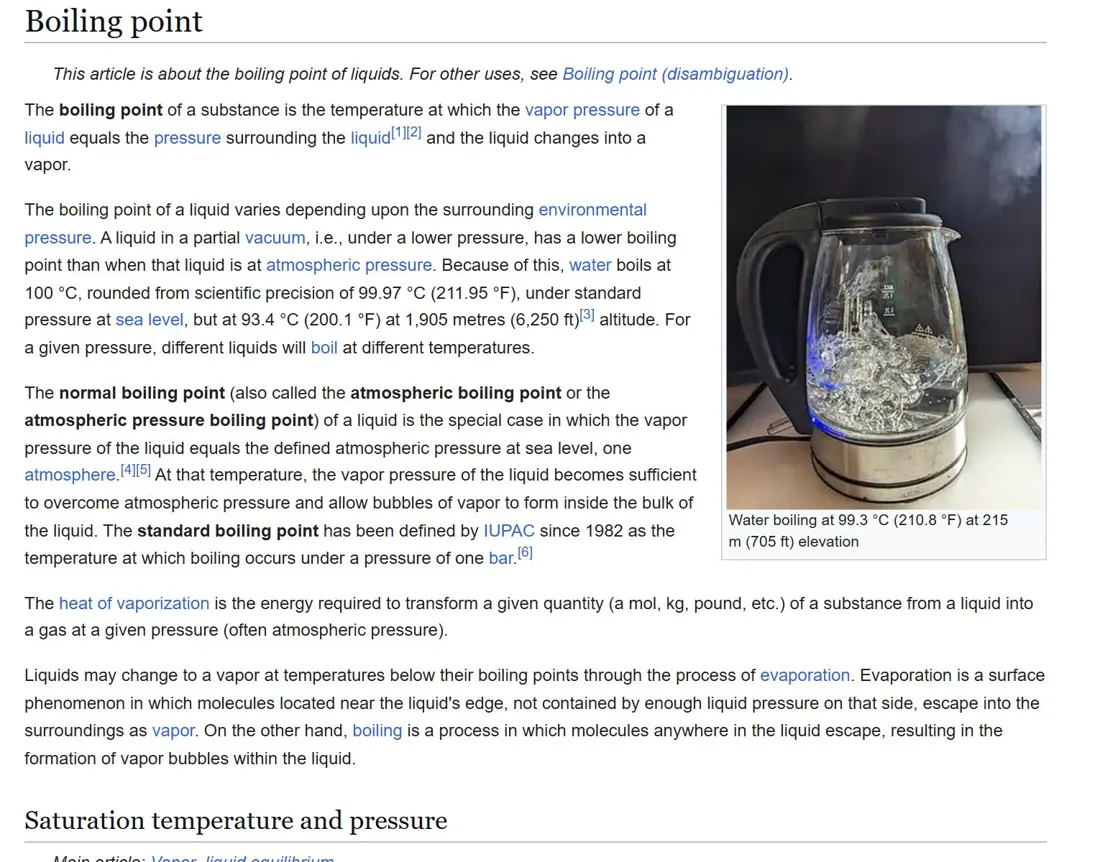
Wikipedia · offline in the Kiwix readerNO INTERNET NEEDED
Real screenshot of the Wikipedia article Boiling point in the Kiwix reader
Real screenshot: Wikipedia in the Kiwix reader (Aug 2026 build). Wikipedia text CC BY-SA; images under their own free licences.

See the full list →

§ 02 How it works

One evening to set up. Then pull the plug.

You do the big download once, while the internet works. After that nothing needs a connection, an account or a login.

01

Buy and download

You get the installer, the setup guide and the playbook by email straight away.

02

Run the installer

It fetches Wikipedia and WikiMed from Kiwix's own mirrors, adds the NZ maps and sets up the assistant.

03

Turn the Wi-Fi off

Open the start page. Search, read the map, ask the assistant. It all keeps working.

No internet after setupNo accountWindows and MacRuns on laptop battery

When the cloud is down

Ask it the way you'd ask ChatGPT.

Same plain-English questions. The difference is where the answer comes from: your laptop. And Wikipedia is right there to check it.

offline-brain / start-here WI-FI ON
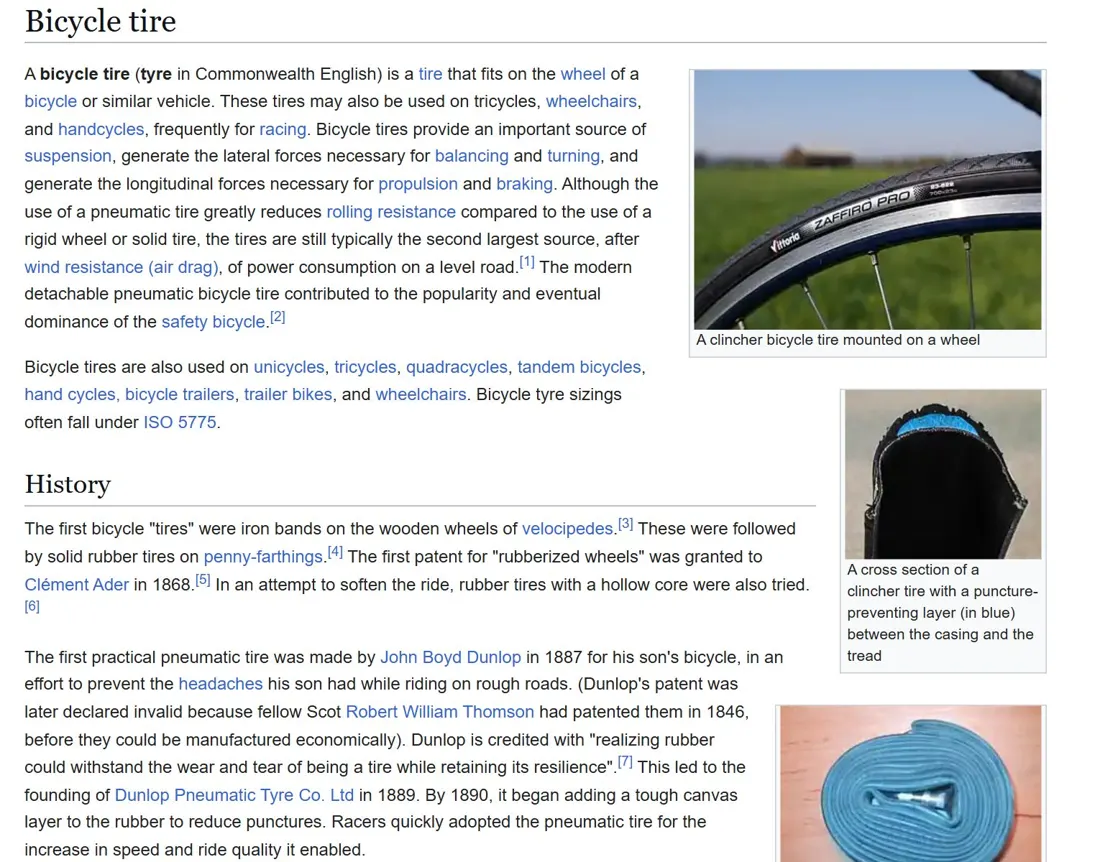
Real screenshot of the Wikipedia article Bicycle tire, open offline in the Kiwix reader
OFFLINE ASSISTANTON THIS LAPTOP

1. Lever one side of the tyre off the rim.

2. Pump a little air in, listen for the hole.

3. Roughen, glue, patch, refit, pump.

Check it: Wikipedia › Bicycle tire

Real screenshot: Wikipedia in the Kiwix reader (Aug 2026 build). Wikipedia text CC BY-SA; images under their own free licences. The assistant panel is an illustration.

§ 03 Pick how you want it

Start with the download.

The download is ready today. The pre-loaded USB is coming: join the list and we'll tell you first. Kit add-ons ship from our suppliers.

Available now

01 · Digital

Offline Brain Download

NZ$49one payment

  • Installer that sets everything up
  • Wikipedia, WikiMed, NZ maps, local AI
  • "When the internet goes down" playbook (PDF)
  • 12 months of update emails
  • 30-day money back
Get the download →

Instant email delivery. Wikipedia with images alone is 119 GB, so check your free space.

02 · USB, 256 GB

Offline Brain USB

NZ$129expected price

  • Everything above, pre-loaded and tested
  • Plug in and open: nothing to download
  • Ships from Auckland, NZ Post tracked
  • No payment to join the list
Join the USB list →

One email when pre-orders open.

03 · Add-ons

Kit add-ons

From launch

  • Crank and solar radio
  • Rechargeable headtorch
  • Emergency blankets and a waterproof pouch
  • Meshtastic messaging node (915 MHz)
See the add-ons →

Shipped from our suppliers. Prices set when stock is confirmed.

Swipe to compare →

ComparedOffline Brain DownloadBuild it yourselfCloud AI only
Works with no internetYes, after setupYes, if it worksNo
NZ map pack ready to useYesFind and convert itNo
Set-up timeOne installerAn evening of researchNone, until it's down
Tested on Windows and MacBefore each updateUp to youn/a
Updates12 months includedRedo it yourselfAutomatic, online only
Your questions stay on your laptopYesYesNo, sent to a server
CostNZ$49 onceFree, plus your timeFree to about US$20 a month

§ 04 Kept fresh

Bought once. Up to date for a year.

Wikipedia and the maps change every month. For 12 months we email you when a new tested build is ready, with a one-click update. After that, it keeps working exactly as it is.

EVERY UPDATE

Newer Wikipedia

We move to the latest Kiwix build once we've tested it.

EVERY UPDATE

Fresher NZ maps

New roads and tracks from OpenStreetMap, re-packed for offline use.

WHEN IT'S BETTER

A better local model

When a stronger open-licence model runs well on an ordinary laptop, we swap it in.

Straight answers

Questions.

All questions →

Isn't all this free online?
Yes, and we credit it. Wikipedia, WikiMed and OpenStreetMap are open. You're paying for us to choose it, set it up, test it and keep it updated, so it works the moment you need it, when you can't download anything.
Is AI going to take over?
We don't know, and we don't think anyone does. What we do know: online AI and cloud services go down often (see AI Watch for real counts), and they sometimes get things wrong. This is a backup that doesn't depend on them.
How good is the offline assistant?
It's a small model that runs on a normal laptop, so it's less capable than the big online ones. That's why Wikipedia and WikiMed sit right beside it: check anything important there. We'll publish our own test results before the USB launches.
Do I need to be technical?
No. Run the installer, wait for the download to finish, then open the start page. The setup guide walks you through it with screenshots.

The USB waitlist

Want it on a drive, ready to plug in?

256 GB, loaded and tested in Auckland, expected at NZ$129. Put it in a drawer and forget it, until the day you don't. Join the list: no payment, one email when pre-orders open.